A diff shows lines, not structure.
It tells you which lines changed. It doesn't tell you what calls them, or what they reach. That part you rebuild in your head, every review.
v1.2.0—Free on the VS Code Marketplace·
CoGraph shows which functions in your repository call which, as a graph next to your code in VS Code. It reads the source and never runs it. Same code, same graph.
code --install-extension thraenbe.cograph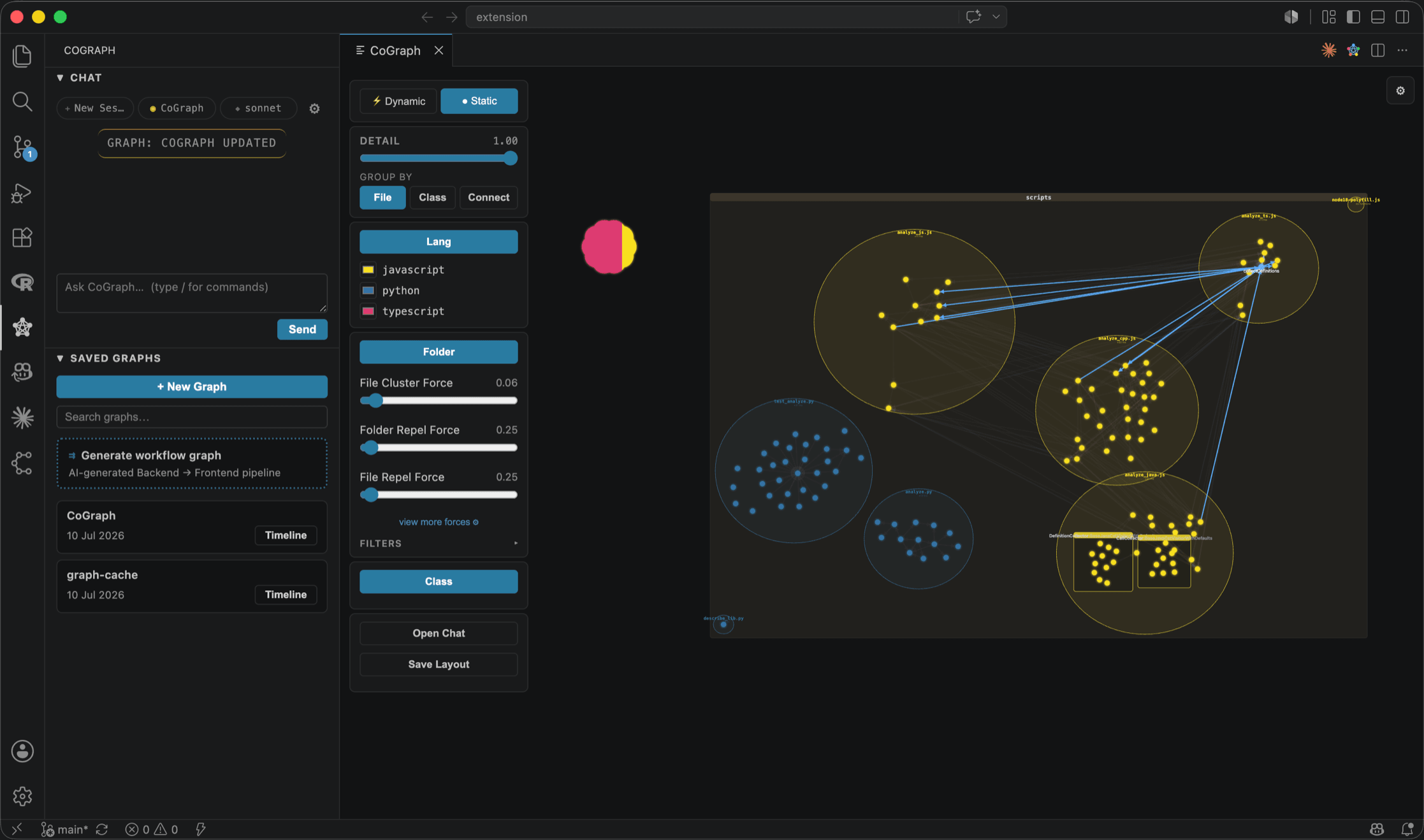
Coding assistants changed how fast code gets written. They didn't change how fast a person can understand it — and understanding is still what review, onboarding and every architectural decision depend on.
It tells you which lines changed. It doesn't tell you what calls them, or what they reach. That part you rebuild in your head, every review.
When much of a module came from an assistant, there is no author to ask how it fits together. The mental model has to be recovered from the code itself.
An architecture diagram is right the day it is drawn and drifts from then on. A stale map is worse than no map.
There is no model guessing at your architecture. CoGraph reads the syntax tree and records what is there — so the graph you see today is the graph you'll see tomorrow, until the code changes.
Each language's own parser reads your workspace: Python's ast, the TypeScript compiler API, java-parser, tree-sitter for C++. Each runs as a local process, and your code is never executed.
1def checkout(cart):2 total = price(cart)3 bill = invoice(total)4 notify(bill)56def price(cart):7 return cart.subtotal89def invoice(total):10 return render(total)1112def render(total): ...13def notify(bill): ...Every function definition becomes a node, identified by file, name and line. Every call the parser can resolve becomes an edge. The same code always yields the same graph.
{
  "nodes": [
    { "id": "app.py::checkout::1",
      "name": "checkout", "line": 1 },
    { "id": "app.py::invoice::9",
      "name": "invoice", "line": 9 },
    …
  ],
  "edges": [
    { "source": "app.py::checkout::1",
      "target": "app.py::invoice::9" },
    …
  ]
}The graph opens beside your editor. Click a node to jump to its definition. Save a file and the graph is derived again.
Free in VS Code today. Open a folder, run CoGraph: Visualize Project from the command palette, and move through the code by what calls what.
Zoom, pan and filter by name. Group by folder, file or class, and use the detail slider to fold low-connectivity nodes away until the structure is legible.
Jump to any function's definition, or open its source in a popup you can drag, resize and keep open beside others.
Colour nodes by git status — modified, new, deleted, staged — to see where your uncommitted work sits in the structure and what it's wired to. It refreshes when the git index does.
Save a file and the graph is re-derived. In large repositories only the saved file is re-parsed.
Large-repo mode starts with an instant folder skeleton and parses folders as you open them. External libraries collapse into one node each.
Timeline playback builds the graph in commit order, so you can watch an architecture take shape.
An architecture chat and a workflow view can sit on top of the graph. Nothing runs until you enable them; then they use your own Claude Code or Codex CLI, with your own keys and a budget cap per request. The graph never depends on them.
Analysis runs in local processes on your machine. There is nothing to sign up for and nowhere for your code to be uploaded to.
The graph comes from static analysis. CoGraph parses your source files; it never imports, builds or runs your project.
The optional AI features are the only part that talks to a model, through your own CLI and account, and only once you switch them on.
The editor is the first surface. Because the graph is derived the same way every time, it can also live in the repository and be compared across pull requests. That work is in design, and we are shaping it with design partners.
CoGraph for VS Code. Read the graph where you write the code.
v1.2.0 · Free · MITThe graph as a file committed next to the code — byte-stable output and a documented schema, versioned like everything else.
Regenerate the graph for each pull request and compare it with the base branch. The diff shows which functions and calls a change adds, removes or rewires.
A pull request page with the change read on the graph. It shows the direction; it is not something you can install.
We are looking for a few engineering teams to pilot what comes next. It's an invitation to shape something, not a pitch to buy something.
We reconstruct a baseline from your last 90 days of pull requests.
Install on one repository.
Use it in real review, with a direct line to both founders.
We go through the results together — including what didn't work.
CoGraph came out of a working engineer's own problem — Bela started it after a data-science internship at Bosch. We build it in Tübingen, in the open.


Something missing? Open an issue on GitHub or message us — we answer both.
Yes. The VS Code extension is free and MIT-licensed, and the source is on GitHub. A team version for repositories and pull requests is in design with design partners.
Not with the extension. Parsing happens in local processes and there is no CoGraph server. The one exception is the optional AI layer: it is off by default, and once you enable it, it runs through your own Claude Code or Codex CLI under your own account.
Not in the graph. Nodes and edges come from each language's parser, so the same code always produces the same graph. The optional AI features — an architecture chat and a workflow view — sit on top of it and are off by default.
Python, TypeScript, JavaScript, Java and C++. Coverage is strongest in Python and TypeScript. Calls that only resolve at runtime — dynamic dispatch, reflection, eval — are not in the graph, and macro-heavy C++ is covered partially.
Large-repo mode engages automatically: it shows an instant folder skeleton, parses folders lazily as you open them, and caches results between sessions. Repositories the size of NumPy or Django stay navigable.
An AI reviewer writes comments on a pull request. CoGraph writes nothing: it derives a model of the code that you read yourself, and it never comments, approves or blocks. The two sit side by side.
Install the extension, open a folder, and run CoGraph: Visualize Project.
code --install-extension thraenbe.cograph